OpenClaw + Mac mini Explained: What Works, What Doesn’t, and What You Really Need
OpenClaw doesn’t behave like most AI tools. It doesn’t wait for you to open a tab, type a prompt, and move on. It stays on. It listens for messages. It holds context over time. Before long, it feels less like an app and more like a small system quietly running in the background. That shift explains why so many people start looking at an OpenClaw Mac mini setup. Not because a Mac mini is required, but because always-on software changes how you think about where it should live. Laptops sleep. Browsers close. Agents keep running. This is why questions like “Do you need a Mac mini for OpenClaw?” come up so often, and why comparisons such as OpenClaw VPS vs Mac mini keep resurfacing. This article looks at what’s really behind the Mac mini trend, what works in practice, and what matters when choosing a stable home for an always-on AI agent.
What OpenClaw Is and How Always-On AI Agents Work
OpenClaw starts to make sense once you stop treating it like a chatbot. A normal chatbot is like a vending machine. You press a button, get a response, and walk away. OpenClaw behaves more like a quiet assistant sitting in the room with you. It stays on. It notices messages as they arrive. It remembers what happened yesterday and last week. Over time, it feels less like something you “use” and more like something that’s simply there while you work.
That puts OpenClaw in a different category. It belongs to a growing group of always-on AI agents built to run continuously, not in short bursts. These agents don’t reset after every question. They build context, react in the background, and slowly become more useful the longer they run. Once you understand that, it becomes clear why people start thinking differently about where OpenClaw should live.
Always-On Agent Model
An always-on agent does not wait for permission to exist. It keeps running, keeps listening, and keeps track of what matters. That persistence is the whole appeal. But it also means the agent depends on a stable place to run. If the machine sleeps or shuts down, the agent effectively goes quiet too, like a personal assistant stepping out of the office.
Messaging-First Design
Instead of living in a browser tab, OpenClaw lives where conversations already happen, such as iMessage, Slack, Telegram, and Discord. That choice changes behaviour. You don’t “open” OpenClaw. You talk to it the same way you message a colleague. Small questions add up. Quick notes turn into ongoing threads. Over time, that constant presence is what makes hosting and reliability matter.
Persistent State and Local Data
Because OpenClaw is always running, it remembers. Logs build. Context deepens. Old conversations quietly shape new ones. Think of it like a notebook that never gets wiped clean. That’s incredibly useful, but it also means storage needs grow naturally. The goal isn’t hoarding data. It’s knowing the memory you’re building will still be there tomorrow.

Why Mac minis Are Commonly Associated With OpenClaw
If you spend enough time around OpenClaw discussions, a pattern pops up. Someone mentions running it, and a Mac mini shows up in the story shortly after. That often leads people to ask, “Do you need a Mac mini for OpenClaw?” even though the answer isn’t as simple as yes or no. It doesn’t mean OpenClaw requires one. It usually means people noticed how the software behaves and adjusted their setup to match. Always-on tools tend to drift toward always-on machines.
Reliability for Continuous Operation
OpenClaw works best when it can stay awake. Laptops are great, but they sleep, move around, and get closed without warning. Small desktop systems don’t. That’s why people often choose them for background services. A Mac mini fits neatly into that role. It uses little power, stays plugged in, and can sit quietly doing its job without competing with your daily work.
Apple Ecosystem Alignment
For Apple users, the pull is even stronger. If OpenClaw lives inside iMessage or supports Apple-first workflows, using Apple hardware feels natural. Everything stays in one ecosystem. That advantage fades quickly if you rely on other platforms or don’t use Apple messaging at all.
Popular Choice, Not a Requirement
It’s worth saying clearly. OpenClaw runs on multiple platforms. The Mac mini is popular because it’s convenient and familiar, not because it’s mandatory. Community advice often follows what’s easiest, not what’s strictly necessary.
Hosting Options for OpenClaw and Similar AI Agents
Once you accept that OpenClaw is meant to stay awake, hosting stops being a technical decision and starts feeling more personal. Where it runs affects how reliable it feels, how often you have to think about it, and how comfortable you are letting it sit in the background. There isn’t a perfect choice. There are trade-offs, and each one suits a different kind of user.
Virtual Private Servers (VPS)
A VPS provides continuous uptime independent of local power or connectivity. It stays on, day and night, without caring about your power cuts or Wi-Fi mood swings. That distance brings peace of mind. Your agent keeps running even when your laptop is shut down. The flip side is detachment. You gain uptime, but you also accept that the system lives somewhere you never touch, which means staying organised and checking in matters more. At this point, many people naturally start weighing OpenClaw VPS vs Mac mini, thinking about whether they value hands-off reliability more than local control and familiarity.
Dedicated Local Machines
A dedicated local machine sits closer to home, both literally and mentally. A spare desktop or compact computer gives you a sense of control. You know what it’s doing and what it isn’t. This option often feels like a middle ground. More stable than a personal laptop, less abstract than a server in the cloud. Isolation still matters here, not because the hardware demands it, but because clear boundaries reduce surprises later.
Primary Personal Computers
Running OpenClaw on your main computer is the easiest path. No extra boxes. No extra costs. But personal machines live busy lives. They sleep, restart, travel, and change focus throughout the day. When an always-on agent shares that space, lines can blur. That’s why separation is often suggested in principle. Not as a strict rule, but as a way to keep helpful automation from quietly becoming another thing you have to manage.
Understanding Security as a Configuration Consideration
When security comes up around OpenClaw, it’s easy for the conversation to drift in the wrong direction. The software itself isn’t the risk. The setup is. That distinction matters. OpenClaw behaves like any always-on AI agent. What it can access, remember, or act on depends entirely on the boundaries you give it. Change the boundaries, and the picture changes with them.
Always-On Agents and Expanded Capabilities
An agent that runs all the time naturally feels more capable. It sees more. It remembers more. It responds without being asked every single time. That’s the appeal. But capability and responsibility grow together. The agent doesn’t decide how far it reaches. Permissions do. Keep those narrow, and the agent stays focused. Open them wider, and it needs more care, not because it’s unsafe, but because it’s more involved.
The Role of Isolation and Scope
Isolation should not be seen as a way to completely eliminate risks. Instead, it should be seen as a way of containing the impact of the risk. So by keeping the agent isolated logically or physically, we can better understand its role by clearly establishing its boundaries.
Manageable Risk With Proper Setup
Security is not a simple toggle that you can flip on or off; it is a comfort you reach over time. Most people get comfortable over time, gradually adding more checks until they’re comfortable without feeling like the agents are intrusive in their lives. The goal is not to have an overly restrictive system. Instead, you create a system that aligns with what you are comfortable with.

Common Considerations When Running Always-On AI Agents
Once an AI agent is always running, a few shared considerations tend to surface, no matter which tool you’re using. These aren’t OpenClaw-specific. They apply to any system that listens, remembers, and acts in the background. The key is staying thoughtful without becoming paranoid.
Access Scope and Permissions
What an agent can do is shaped entirely by what you allow it to touch. Give it more access, and it becomes more helpful. Keep that access narrow, and it stays focused. Most people don’t decide everything upfront. They add capabilities slowly as trust builds. That cautious approach makes it easier to be comfortable with what the agent is doing.
Input Sources and Trust Boundaries
Always-on agents learn from inputs that already flow through your day. Messages, emails, and web content all feed into their understanding. That’s convenient, but it helps to be aware of where information is coming from. Clear boundaries act like filters, not walls. They let useful signals through while keeping noise from shaping behaviour.
Operational Awareness
Because these agents never really “close,” they benefit from light oversight. Not constant checking, just awareness. Think of it like a server humming in the corner. You don’t watch it all day, but you notice if it goes quiet. Treating agents as infrastructure keeps expectations realistic and helps automation stay helpful rather than surprising.
Hardware Considerations for Stable Long-Term Operation
When you run an always-on AI agent, hardware fades into the background, which is exactly how you want it. The goal is not peak performance. It’s consistency. Systems that run quietly day after day tend to outperform clever setups that need constant attention. In practice, many people treat the device less like a desktop and more like a small Mac mini always-on server that quietly runs in the background.
Uptime and Power Consistency
Always-on agents rely on continuity. Interruptions break context, pause background work, and create small gaps that add up over time. That’s why predictable power and steady runtime matter more than raw speed. A stable environment lets the agent behave like infrastructure instead of a tool that keeps restarting its train of thought.
Storage Growth Over Time
Long-running agents naturally collect things. Logs, memory files, state snapshots. None of it feels big at first, but it accumulates quietly. That’s why planning for expansion early on can prevent the stress of hitting your storage limits later on. Expandable storage is flexible because changes can occur naturally without being disruptive.
Connectivity and Peripheral Stability
Consistent input and output matter more than maximum bandwidth. Always-on agents depend on reliable connections to messages, services, and storage. Reducing bottlenecks and avoiding flaky peripherals keeps behaviour predictable. When connections stay stable, the agent fades into the background, which is usually a sign that the setup is working as intended.
Using a Mac mini as an Always-On AI Host
The Mac mini often comes up in always-on AI setups, not because it’s the only option, but because it fits a certain way of working. People reach for it when they want something that can sit in one place, stay on, and quietly do its job. In that role, it makes sense as one option among many. A typical OpenClaw Mac mini setup starts simple, then grows as the agent proves useful and dependable over time.
Where the Mac mini Fits Well
A Mac mini is easy to live with. It’s small enough to forget about, quiet enough not to notice, and efficient enough to run all day without concern. That makes it well-suited to long-running services that don’t need attention. Once it’s set down, it behaves more like infrastructure than a personal computer, which is often exactly what people want.
Practical Limitations to Consider
Its limits are mostly about growth. Storage inside the machine doesn’t expand, ports are all at the back, and extra gear adds up quickly. None of this is a flaw on its own, but it does shape how you plan. The Mac mini works best when you expect change and build with that in mind, rather than treating it as something you’ll never need to revisit.

Why Docking and Expansion Are Often Part of the Conversation
Docking and expansion rarely start as a deliberate decision. They tend to appear after an always-on agent has been running long enough to feel normal. At first, everything is simple. Then the system grows. More data sits in the background. Another cable gets added. Nothing breaks, but the setup starts to feel less settled. Expansion isn’t something you’re pushed into. It’s something you choose once the rough edges show up.
Growth of Supporting Needs
Always-on agents quietly gather helpers. Extra storage for memory and logs. Easier access to ports. A way to glance at what’s running without unplugging half the desk. These needs arrive one at a time, which is why external solutions become common. They smooth out small friction points without forcing a full rethink.
Value of Purpose-Built Expansion
There’s a difference between adding parts and building a setup that feels stable. Generic hubs can work, but they often introduce tiny annoyances that add up. Loose connections. Awkward layouts. Moments where things feel fragile. Purpose-built expansion isn’t about power or speed. It’s about confidence. When the setup grows without becoming messy, the whole system fades into the background, which is usually the sign it’s doing its job.
Docking Solutions Designed for Mac mini Setups
Docking usually becomes relevant once a Mac mini has earned its place. The setup stops changing every week. The machine stays on. The cables stay put. Then small frustrations start to surface. Storage fills faster than expected. Ports run out. Quick checks turn into awkward desk gymnastics. Docking isn’t about adding more. It’s about making what you already have feel settled again.
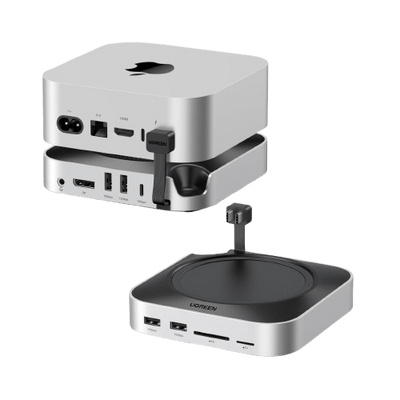
UGREEN Mac mini Docking Station with NVMe SSD
The UGREEN Mac mini docking station with NVMe SSD starts to make sense when storage growth stops being an abstract concern. Always-on agents quietly collect logs and memory, and internal space disappears without much warning. Having integrated expansion, up to 8TB, keeps everything in one place. Because the dock matches the Mac mini’s footprint, it feels like part of the machine rather than another box on the desk. Fewer loose drives. Fewer cables. Less to think about.
{{UGPRODUCT}}
UGREEN Mac mini Dock with Display Support
The display-focused dock answers a different need. Long-running setups often benefit from a simple way to see what’s going on. A status screen. A dashboard. A quick glance for reassurance. Stable display support makes that easy without turning the Mac mini into a workstation you constantly interact with. It stays quiet, visible when needed, and out of the way the rest of the time, which is exactly what you want from something that’s meant to stay on.
{{UGPRODUCT}}
Example Use-Case Scenarios
Most people don’t start with a clear plan for how an always-on agent will fit into their life. They learn by using it. Over time, patterns form. What begins as curiosity often turns into habit, and sometimes into experimentation. These scenarios reflect those natural stages rather than ideal setups.
Evaluation or Trial Use
This is the low-pressure phase. The agent runs with a narrow role and very few connections. You’re not asking it to do much yet. You’re watching. Does it respond the way you expect? Does it remember things you care about? Leaving it alone for a while is part of the test. The goal here is comfort, not efficiency.
Personal Always-On Assistant
Reliability doesn’t come from copying popular builds or chasing the “right” device. It comes from making choices that match your habits and comfort level. Infrastructure works best when it stays flexible and quietly dependable, supporting what you do without asking for constant attention.
Advanced or Experimental Use
This stage attracts people who like to push systems further. Integrations expand. Monitoring becomes more intentional. The agent starts to resemble infrastructure rather than assistance. At that point, the focus shifts to keeping things understandable. Growth is welcome, but only if it stays manageable and doesn’t turn into work of its own.
Conclusion
OpenClaw doesn’t require special hardware to do its job well. What makes the difference is how it’s run. The same ideas apply to any always-on AI agent: steady uptime, clear boundaries, and a setup you can live with long term. Reliability doesn’t come from copying popular builds or chasing the “right” device. It all boils down to choosing what matches your habits and comfort level.
FAQs
Do I need a Mac mini to run OpenClaw?
No. A Mac mini is one option, not a requirement. OpenClaw can run anywhere that offers stable, always-on hosting.
Why are Mac minis often recommended for OpenClaw setups?
They’re quiet, efficient, and easy to leave running. That convenience often turns into recommendations, even when other options work just as well.
Can OpenClaw run on a VPS instead of local hardware?
Yes, it is possible. Many people tend to use VPS, as it removes concerns about power, internet outages, or physical access.
Are security considerations specific to OpenClaw or common to all AI agents?
They’re common to any always-on agent. The true risk comes from what you allow the agent to access.
How does configuration affect OpenClaw’s behavior?
Configuration decides what the agent has access to. The decisions you make here will determine how helpful or restrained the agent is over time.
Why do always-on AI agents require more storage over time?
They collect logs, memory, and context quietly. This growth rate is not wasteful. It is the inevitable cost of continuity.