Mac mini vs PC vs Cloud: Best Way to Run OpenClaw
OpenClaw is a revolutionary shift in how we interact with our AI assistants. Unlike browser-based chatbots, which run as isolated experiences, OpenClaw is an open-source AI agent running inside a messaging surface and acting autonomously on behalf of users. In a matter of weeks, the platform has grown to 300,000 users and garnered more than 160,000 GitHub stars since its launch in November 2025.
The optimal configuration for running OpenClaw is online, stateful, maintainable, and secure. This is because it changes the nature of the assistant from a toy to a real infrastructure. The Mac mini is the default choice for users and businesses who want to run OpenClaw as infrastructure, not an experiment.
What Is Openclaw, And What Does It Need from A Host Machine
OpenClaw is an always-on assistant with the ability to have persistent memory across sessions, enabling the automation of actions that would otherwise need human involvement. It has the ability to run shell commands, handle email and calendars, interact with messaging apps, and utilize skills developed by the community. It stores its memory in the form of plain Markdown files and uses a combination of search techniques for its searches.
The importance of the host machine for OpenClaw, unlike for normal applications, is clear when looking at the requirements for running the application. It has a gateway process that runs continuously, requires storage for memory logs, and has the need for a network connection with remote access capabilities since the user wants to interact with the assistant anywhere, anytime.

Source: scaleway.com
Comparison framework: The 6 criteria that decide the best platform
In evaluating any of the OpenClaw hosting platforms, we need to consider six important aspects that will determine the viability of the platform in the real world.
1. Reliability for 24/7 operation
Reliability is important to ensure that the platform is operational at all times without any human intervention. This is important to the viability of OpenClaw, as its whole value proposition is based on its ability to be operational at all times. A virtual assistant that needs to be restarted daily or goes to sleep mode is not doing its job properly.
2. Security and isolation options
This is an important criterion that will decide the ease of security configuration for your credentials, process isolation, and preventing any unauthorized access. OpenClaw needs deep system access to be effective, so security is of utmost importance. According to Censys, 21,639 public-exposed OpenClaw instances were accessible from the public internet as of January 31, 2026.
3. Ease of setup and maintenance
The level of technical knowledge needed to set up and maintain the system initially is of primary concern to the majority of users.
4. Total cost of ownership over 12 months
The costs to be considered are hardware costs, the cost of electricity, hosting costs, and unforeseen costs like storage upgrades and bandwidth costs. Front-loaded costs are more competitive in the long term.
5. Performance of the system in automation and potential use of inference
The computational power of the device is critical in the operation of the system. OpenClaw relies on external API orchestration of tasks, but the benefits of the M4 chip are considerable. The Mac mini M4 has a 16-core Neural Engine, which runs at over 3x the speed of the M1 chip.
6. Physical workflow needs
Physical workflow requirements include ports, storage, display connectivity, and peripheral support. OpenClaw installations accumulate data through conversation logs, file attachments, and cached content. Adequate storage expansion and convenient port access prevent infrastructure bottlenecks.
Why The Mac Mini Fits Openclaw's Always-On Model
A dedicated always-on box avoids the laptop sleep state problem entirely. Laptops are designed for portability and power conservation, and their default behavior works against continuous operation. The Mac mini, conversely, is engineered as a stationary appliance. User reports and community discussions suggest that the Mac mini is energy-efficient enough to make 24/7 operation economically practical for most home and small-team setups.
The Apple ecosystem is also advantageous for users anchored in iMessage and Apple workflows. OpenClaw integrates with messaging platforms where users already spend time. The Mac mini's native support for Continuity features enables seamless handoff between devices, unified clipboard, and message forwarding. Users can start an automation request on their iPhone and monitor execution status from their Mac, or receive OpenClaw notifications across all Apple devices simultaneously.
Why Mac Mini Wins Against a Typical PC For This Specific Job
The Mac mini wins in terms of hassle factor for the dedicated always-on assistant device because of the built-in SSH server capabilities, the ease of configuring the device for remote access, and the native compatibility with the UNIX environment, which are all natural fits with the OpenClaw architecture and its requirement for a stable command-line environment.
Additionally, clean separation from primary workstation habits prevents OpenClaw operations from interfering with daily computing tasks. Running the assistant on your main work computer introduces resource contention during intensive tasks.
Mac Mini Needs Expansion to Become a Real "Openclaw Box"
Port access, storage expansion, and desk ergonomics are daily pain points once OpenClaw is treated like infrastructure. The base M4 Mac mini includes limited built-in ports, i.e., three Thunderbolt 4/USB-C ports on the rear, two USB-A ports, HDMI, and Gigabit Ethernet.
Storage constraints also have a tendency to increase over time. The persistent memory of the OpenClaw, which stores conversation logs, API cache, and skills, has shown instances where users, especially those with heavy automation scripts, have seen their storage usage exceed 100GB after several months. The base model comes with a 256GB SSD, but after system requirements, there is insufficient space for long-term usage.

Source: unsplash.com
Where UGREEN fits: turning the Mac mini into a complete OpenClaw station
UGREEN manufactures purpose-built docking solutions that address the Mac mini's expansion constraints directly. Two models target different user profiles.
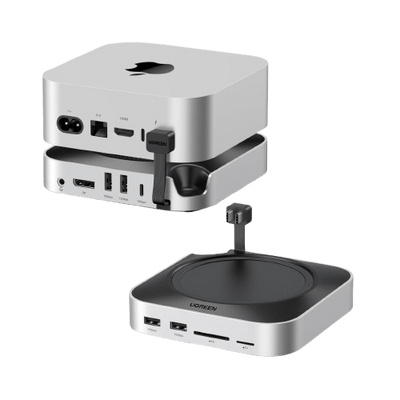
The UGREEN Mac mini M4 Docking Station with NVMe SSD is for those who want maximum connectivity options for their Mac mini, especially for storage-centric builds. The dock station has 11 ports, consisting of a 10Gbps NVMe SSD enclosure with up to 8TB of extra storage, three 10Gbps USB-A ports for data transfer, a USB-C port for data transfer, and SD and TF card readers. The dock station can house the Mac mini on top, providing a compact vertical form factor with a minimal footprint.
{{UGPRODUCT}}
On the other hand, the UGREEN Mac mini M4 Dock with 4K 144Hz DisplayPort targets setups that treat the Mac mini as both a desk workstation and always-on assistant. This variant adds DisplayPort capability supporting 4K resolution at 144Hz, enabling high-refresh-rate displays for users who interact directly with the OpenClaw control interface. The integrated SSD enclosure provides storage expansion while the comprehensive port array supports desk workflows.
{{UGPRODUCT}}
Cloud hosting and VPS for OpenClaw
In cloud hosting, there are inherent benefits to particular scenarios. Uptime is built into the model. VPS providers offer uptime guarantees through redundant infrastructure. Power failures, internet outages, and hardware failures are the VPS provider's problem, not the user's.
Remote access from anywhere works without having to set up home firewall rules or needing dynamic DNS services. When the user travels internationally, access to the OpenClaw instance is as easy as if the user were at home. The quality of the connection is dependent on the VPS provider's infrastructure rather than the home internet connection.
Why the cloud is not automatically the best for everyone
Operational overhead persists despite managed infrastructure. Users must configure firewall rules, manage secrets and API keys securely, handle remote administration, and monitor resource consumption. These tasks require technical expertise and ongoing attention.
Multiple security analyses have demonstrated how easily self-hosted automation and agent systems can become publicly accessible when network boundaries and access controls are misconfigured. This highlights that cloud hosting does not eliminate security responsibility, but instead shifts it into different operational domains.
UGREEN dock selection mini guide
The selection of the UGREEN Mac mini docking solutions from the available options primarily depends on the storage and display needs.
- Storage and connectivity first:The UGREEN Mac mini M4 8TB Dock should be chosen if the storage needs are the priority. This would be the preferred option if the user needs to run automation programs and needs more storage space to maintain the conversation history logs and needs more storage space.
- Display workflow first: The UGREEN Mac mini M4 4K Docking Station with DisplayPort should be chosen if the display needs are the priority. It is suitable if the user needs the Mac mini to perform multiple tasks at the same time and needs to interact directly with the OpenClaw interface.
Both options deliver the core expansion requirements. They provide adequate USB ports for peripherals, SD card readers for data transfer, and the crucial NVMe storage expansion that prevents capacity constraints from limiting OpenClaw's long-term operation.
Conclusion: Mac Mini Is The Best Way To Run OpenClaw
The best way for OpenClaw to be used is as invisible infrastructure, always on and persistently available, and accessible via the usual messaging apps without conscious effort. For this, it needs a host platform that doesn’t demand attention.
The default choice for the host platform is the Mac Mini because it behaves like an always-on appliance, encourages better separation from other workstations, and best matches the actual usage pattern for OpenClaw. The 24/7 reliability, integration with the Apple world, power consumption, and maintenance needs match OpenClaw's needs better than PCs or cloud-based solutions for most users.
The Mac mini can function as a complete OpenClaw solution with specially designed expansion. UGREEN docking solutions turn port scarcity and storage constraints from roadblocks into solutions, making the Mac mini function as infrastructure rather than an experiment. For individuals, small businesses, or home users looking for a reliable solution for running an OpenClaw deployment, the Mac mini strikes the perfect balance of power, cost, and upkeep.
FAQs
1. Is a Mac mini powerful enough to run OpenClaw 24/7?
Yes. OpenClaw itself is lightweight because it mainly orchestrates APIs rather than running large AI models locally. Even base-model Mac mini systems can handle continuous operation reliably.
2. Is running OpenClaw on a PC cheaper than a Mac mini?
It depends. If you already own a desktop PC, it may be cheaper upfront. However, PCs typically consume more power, which increases long-term electricity costs compared to a Mac mini.
3. How much does it cost per month to run OpenClaw in the cloud?
Basic VPS hosting can range from $10 to $40 per month, depending on performance needs. Over time, this may exceed the one-time cost of a local machine.