Is a Mac mini Worth Buying to Run OpenClaw 24/7?
Every OpenClaw setup guide seems to start the same way: "Step one, buy a Mac mini." The compact Apple desktop has become so synonymous with the viral AI assistant that retailers have reported stock shortages driven by the OpenClaw hype.
But does it actually make sense to spend $500+ on dedicated hardware for an AI assistant you could run in the cloud for a few dollars a month?
This guide breaks down the real costs, the genuine alternatives, and the honest answer to whether a Mac mini OpenClaw setup makes financial sense. We'll cover what you actually need, what you're paying for, and who should (and shouldn't) make this purchase.
What Does OpenClaw Actually Need to Run?
OpenClaw itself is lightweight – it's an orchestration framework, not an AI model – so a basic cloud API setup runs comfortably on almost any modern computer with 4-8GB of RAM.
When you use cloud APIs like Claude or GPT-4, the heavy computation happens on remote servers. OpenClaw just acts as a gateway between your messaging apps (iMessage, WhatsApp, Telegram, Slack) and those AI providers. A Raspberry Pi could technically handle that job.
The equation shifts dramatically when you want to run local AI models through Ollama. OpenClaw requires models with at least 64,000 tokens of context length for reliable multi-step tasks, and those models need serious memory. A capable 14B-parameter model needs 16-24GB minimum. Larger 30B+ models need 48-64GB.
As the community puts it, RAM is the bottleneck, not processing speed.
How Much Does a Mac mini Actually Cost for OpenClaw?
The base Mac mini M4 starts at $599 but regularly drops to $499 on sale, while the configuration most local AI users recommend – 24GB RAM – costs $999 retail or around $890 discounted.

Here's how the current lineup breaks down for OpenClaw use.
The base M4 with 16GB and 256GB storage works well for cloud API usage and handles smaller local models like Llama 3.1 8B. The 24GB model at $999 (often $890) is the practical floor for running capable local models with enough headroom.
The M4 Pro with 48GB at $1,399 runs 30B+ parameter models smoothly. And the M4 Pro with 64GB – the enthusiast "sweet spot" at around $2,000 – handles the largest models the community recommends, delivering around 60 tokens per second on 30B models.
Don't forget accessories. You'll need a keyboard and mouse for initial setup (borrowable), and potentially external storage and a docking station for a complete workstation.
What Does It Cost to Run a Mac mini 24/7?
The Mac mini M4 draws just 3-4 watts at idle – comparable to a Raspberry Pi – translating to roughly $15-25 per year in electricity for typical always-on operation.
Jeff Geerling's widely-cited testing confirmed the M4's remarkable efficiency:3-4 watts total system power at idle, including 10 Gigabit Ethernet and 32GB RAM — a figure he noted is comparable to a Raspberry Pi. Under sustained CPU load, Geerling measured283 Gflops at 42 watts, whileindependent reviews corroborate 40-45 watts as a typical maximum during heavy workloads, dropping back to near-idle between tasks.
For context, a typical desktop PC running 24/7 costs $100-200 per year in electricity. NVIDIA GPU systems running local AI models can pull 300-450W under load. The Mac mini's efficiency is a genuine cost advantage that compounds over years of operation – even moderate daily use works out to $20-25 per year.
Does the Base 16GB Model Handle OpenClaw Well?
For cloud API usage, the 16GB Mac mini M4 runs OpenClaw smoothly – and it can handle smaller local models like Llama 3.1 8B – but serious local AI work needs 24GB or more.

Source: Unsplash
When connecting to Claude or GPT-4, OpenClaw acts as a lightweight gateway. The 16GB model handles this with plenty of headroom, running the gateway, messaging integrations, and background tasks without breaking a sweat.
Local models are where 16GB starts to feel tight. Ollama can run 7-8B parameter models comfortably, but OpenClaw's 64K minimum context requirement limits your options. Larger models that handle complex multi-step tasks start choking above 12-14B parameters on 16GB.
The community consensus is clear: 16GB works for cloud APIs and small local models, but if local inference is a priority, the jump to 24GB is worth every dollar.
Can You Run OpenClaw on an Older or Used Mac Instead?
M1 Mac minis sell for $350-500 used and run OpenClaw perfectly well for cloud API usage, with full iMessage integration and Apple ecosystem features intact.
Every Apple Silicon Mac – M1 through M4 – supports OpenClaw's core functionality. Apple's MLX framework runs modern LLMs efficiently on all these chips. An M1 with 16GB handles cloud-based OpenClaw identically to an M4 for practical purposes, and still runs smaller local models via Ollama.
If budget is the primary concern, an older Apple Silicon Mac beats buying a new M4 with less RAM. An M1 Mac mini with 16GB for $450 used gives you iMessage integration, silent operation, and cloud API capability. Put the savings toward API credits or a future upgrade.
Used Macs hold their value well, too, so you can resell later without taking a major loss.
What Are the Alternatives to a Mac mini?
Linux mini PCs offer more RAM per dollar, cloud VPS hosting costs $5-12 per month for API-only setups, and if you're only using cloud APIs, dedicated hardware may not be necessary at all.

Source: Unsplash
For cloud API usage only, a VPS from Hetzner ($5/month) or DigitalOcean ($5-12/month) runs OpenClaw's gateway around the clock. Some providers even offer one-click OpenClaw deployment templates. That's $60-144 per year versus $500+ for hardware.
For local AI on a budget, Linux mini PCs offer significantly more RAM per dollar.
A Beelink or Minisforum with 32GB DDR5 runs around $400-500 – matching the Mac mini's price with double the memory. High-end options with 96-128GB RAM cost less than equivalent Apple Silicon configurations.
The trade-off is straightforward: Linux alternatives lose iMessage integration, Apple ecosystem features like Shortcuts and HomeKit, and the proven silent operation that Mac mini owners rely on for always-on home use.
Why Do People Choose Mac mini Over Alternatives?
Power efficiency, silent operation, proven reliability, and deep Apple ecosystem integration make the Mac mini the most practical always-on hardware for OpenClaw — with iMessage access as a bonus that no other platform can offer.
The Mac mini has become the default OpenClaw hardware for practical reasons that go well beyond any single feature. Here's what actually drives the decision:
- Power efficiency makes 24/7 viable — At 3-4 watts idle, the M4 Mac mini costs less to run around the clock than most nightlights. Comparable mini PCs idle at similar wattage but hit 75-100W at peak load versus the M4's 40-45W. Over a year of always-on use, that gap adds up.
- Silent enough for any room — The base M4 fan sits at ~1,000 RPM and is inaudible during normal workloads. This matters when your AI assistant runs in a bedroom, living room, or home office. Most users report forgetting the machine is even there.
- Proven long-term reliability — Mac minis have a well-documented track record as always-on machines. Forum users routinely report running them continuously for 10+ years as home servers, with one 2009 model logging over 1,100 consecutive days of uptime before being retired. Apple Silicon models with no moving parts besides a single fan only improve on this.
- Apple ecosystem integration —Shortcuts automation, HomeKit smart home control, and native Apple services like Time Machine and Content Caching add layers of integration that Linux alternatives can't match. If your household already runs on Apple devices, the Mac mini slots in as infrastructure rather than a standalone gadget.
- iMessage access —OpenClaw's iMessage integration requires macOS, making the Mac mini the only option for Apple messaging. Your AI can respond to texts, send tapback reactions, and participate in group chats — turning it into something the whole family actually interacts with rather than a tech experiment only you touch.
- Strong resale value — If the experiment doesn't work out, Mac minis hold their value better than virtually any competing hardware. A two-year-old model still fetches 60-70% of its original price.
What Accessories Do You Need for a Complete OpenClaw Setup?
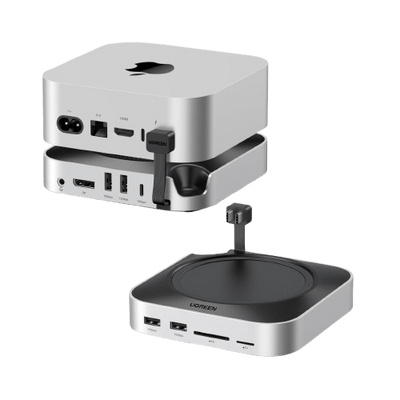
Beyond the Mac mini itself, budget for external storage if you want workspace isolation, and a docking station to manage cables and expand the Mac mini's limited front-facing ports.

Source: Unsplash
Initial setup requires a display, keyboard, and mouse – but only temporarily. After configuration, the Mac mini runs headless. You can manage it remotely via SSH, Tailscale, or OpenClaw's Control UI. So borrow peripherals for the first 30 minutes and return them.
For a clean always-on setup, external storage keeps your AI workspace separate from your system drive – useful for both security and maintenance. The Mac mini M4's two front USB-C ports fill up fast, and the rear ports aren't easily accessible once the machine is in position.
The UGREEN Mac mini M4 Docking Station addresses both problems – it sits underneath the Mac mini, adding 11 ports including 10Gbps USB-A and USB-C, while its built-in M.2 NVMe enclosure supports up to 8TB of dedicated storage.
{{UGPRODUCT}}
The UGREEN 8TB Dock version is particularly practical for OpenClaw users who want a dedicated AI workspace drive without external cables cluttering the desk.
{{UGPRODUCT}}
When Does a Mac mini Beat Paying for AI Subscriptions?
If you're comparing against $20/month AI subscriptions, the hardware break-even depends entirely on how you use OpenClaw – and API costs can dwarf the hardware price if you're not careful.
This calculation is more nuanced than most buyers' guides suggest. The hardware cost is the easy part: $500-1,000 for the Mac mini plus $15-25/year in electricity. But OpenClaw's real ongoing cost is the AI provider, not the hardware.
Using cloud APIs with pay-as-you-go pricing, realistic monthly costs range from $10-150 depending on usage intensity. However, this can quickly add up if left unchecked, from things like unoptimized automation loops.
However, you can connect existing subscriptions, such as Claude Pro ($20/month) or Claude Max ($100/month), directly to OpenClaw, eliminating per-token billing entirely.
Against a $20/month subscription alone, the Mac mini hardware pays for itself in roughly 2-3 years when you factor in the added value of local processing, privacy, and iMessage integration. The math improves significantly if you'd otherwise spend $100+/month on AI services.
Who Should (and Shouldn't) Buy a Mac mini for OpenClaw?
Buy a Mac mini if you want iMessage AI integration, value local processing for privacy, or plan to use OpenClaw as daily infrastructure for 2+ years – skip it if cloud-only AI meets your needs or budget is tight.

Source: Unsplash
The Mac mini makes sense if you want a silent, ultra-efficient always-on host with native Apple ecosystem integration — skip it if a $4-24/month cloud VPS meets your needs or you need 64GB+ RAM on a budget.
Good candidates:
- Always-on users who value efficiency and silence — 3-4W idle power, inaudible fan noise, and 10+ year reliability track records make it ideal for 24/7 OpenClaw infrastructure
- Privacy-focused users — 100% local processing with no data transiting through cloud infrastructure (VPS hosting still routes through third-party servers)
- Apple ecosystem users — native HomeKit, Shortcuts, and iMessage integration that no other platform can offer
- Anyone paying $20+/month for AI services — a base Mac mini pays for itself in under two years versus ongoing cloud costs
Skip the Mac mini if:
- A cloud VPS fits your workflow — Hetzner starts at $4/month, DigitalOcean offers one-click OpenClaw deployment from ~$6/month, and Oracle Cloud has a free tier that runs the gateway fine
- You need 64GB+ RAM — the M4 Pro maxes out at 64GB for $2,199, while a Minisforum or Framework Desktop with 64GB runs $550-$1,744 and offers upgradeable memory
- You're uncomfortable managing a headless server — OpenClaw requires Node.js configuration, launchd daemons, and ongoing maintenance regardless of hardware
- You just want occasional AI queries — if you're happy with ChatGPT or Claude through a browser, you don't need dedicated hardware
The Bottom Line on Mac mini for OpenClaw
So, is a Mac mini worth buying to run OpenClaw 24/7? For cloud API usage only, probably not – a cheap VPS handles the gateway just fine. But for Apple users who want iMessage integration, local AI processing, or a reliable always-on assistant they fully control, the Mac mini delivers genuine value that becomes cost-effective within a couple of years.
The base $499 model (on sale) works for cloud APIs. The $890 24GB version is the practical choice for local AI. Either way, you're getting an efficient, silent machine that earns its place as a dedicated AI workstation – just make sure you budget for the AI provider costs too.
FAQs
Can OpenClaw run reliably on a Mac mini without a monitor attached?
Yes. After the initial setup, OpenClaw runs perfectly in headless mode on macOS. Most users configure it once with a display, then manage everything via SSH, Tailscale, or the OpenClaw Control UI. Headless operation is one of the main reasons the Mac mini is popular for 24/7 OpenClaw deployments.
Does OpenClaw require Apple Silicon, or will Intel Macs work?
OpenClaw itself runs on Intel Macs, but Apple Silicon is strongly recommended. Apple Silicon Macs are far more power-efficient, run modern local models better via MLX or Ollama, and are required for newer macOS features that many OpenClaw integrations rely on long term. Intel Macs also consume significantly more power when left on 24/7.
Is 256GB storage enough for an OpenClaw Mac mini?
For cloud API usage, yes. For local models, it fills up quickly. Local LLMs, logs, embeddings, and workspace data can exceed 100–200GB faster than expected. That is why many OpenClaw users rely on external NVMe storage instead of upgrading Apple’s internal SSD at purchase.
How stable is macOS for running OpenClaw 24/7 compared to Linux?
macOS is extremely stable for always-on workloads when updates are controlled. The main difference is predictability: Linux offers more granular control, while macOS offers better integration and lower maintenance for Apple users. Many OpenClaw users report months of uptime on macOS with no intervention beyond occasional updates.