


Sort By: Best selling
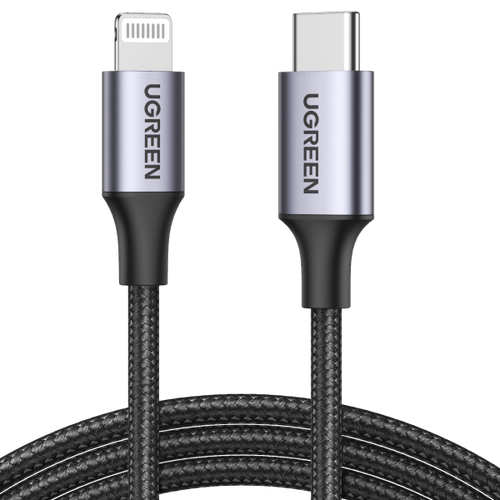


FAQ About Lightning Cable
A Lightning cable is a type of cable used to connect Apple mobile devices such as iPhones, iPads, and iPods to computers, chargers, and other accessories. It was introduced by Apple in 2012 and has since become the standard connector for these devices, replacing the older 30-pin connector. The Lightning cable has a smaller, reversible connector that allows for faster data transfer and charging compared to its predecessor. It's named "Lightning" because of its ability to transmit data and power at lightning-fast speeds.
Here are some common types of Lightning cables:
1. Lightning to USB-C cable: This cable features a Lightning connector on one end and a USB-C connector on the other. It facilitates fast charging and data transfer between Lightning devices (such as iPhones or iPads) and devices with USB-C ports (such as laptops, tablets, or power adapters).
2. Lightning to USB-A cable: With a Lightning connector on one end and a USB-A connector on the other, this cable enables charging and data transfer between Lightning devices and devices with USB-A ports (such as computers, wall chargers, or power banks).
3. Lightning to 3.5mm Audio cable: This cable allows you to connect Lightning-equipped devices (like iPhones or iPads) to audio devices with a 3.5mm audio jack (such as headphones, speakers, or car stereos), enabling audio playback or calls.
4. Lightning to HDMI cable: Enabling connectivity between Lightning devices and HDMI-equipped displays, this cable supports screen mirroring or content playback from Lightning devices (such as iPhones or iPads) to HDMI-compatible displays (such as TVs, monitors, or projectors), allowing you to enjoy multimedia content on a larger screen.
No, not all Lightning cables support fast charging. Whether a cable supports fast charging depends on several factors, including the quality, thickness, and internal construction of the cable. Typically, cables that support fast charging will have thicker wires to handle higher current transmission. Additionally, some cables designed specifically for fast charging may also be equipped with special chips or technologies such as USB Power Delivery (USB-PD) or Qualcomm Quick Charge to achieve faster charging speeds. Therefore, when purchasing a Lightning cable, it's best to check the product specifications to ensure it supports the charging speed you need.
A Lightning cable differs from USB-C primarily in terms of the connector design and the devices they are commonly used with.
1. Connector Design: The Lightning cable has a proprietary connector designed by Apple, which is smaller and reversible, meaning it can be plugged in either way without worrying about orientation. In contrast, USB-C is an industry-standard connector that is also reversible, allowing for easier and more convenient connections.
2. Devices Supported: Lightning cables are primarily used with Apple devices, including iPhones, iPads, and iPods. On the other hand, USB-C cables are used with a wide range of devices from various manufacturers, including smartphones, tablets, laptops, and accessories.
Here are some tips to help you take better care of your Lightning cable, making it last longer:
1. Try to keep the Lightning cable straight to avoid twisting, tangling, or folding.
2. Avoid pulling the Lightning cable forcefully, especially at the connector end, as it may loosen or damage the connector.
3. Avoid exposing the Lightning cable to water or liquids to prevent short-circuiting or corrosion of the connector.
4. When plugging or unplugging the Lightning cable, handle it gently to avoid excessive force or forcing it into place.
5. Try to avoid exposing the Lightning cable to excessively hot environments.
6. Regularly clean the connector to prevent dirt from affecting metal contacts and maintaining stable current transmission.
UGREEN's Lightning Cables are high-quality cables designed specifically for Apple devices with Lightning ports. They are used for charging and data transfer between Apple devices such as iPhones, iPads, and iPods, and computers or power adapters. UGREEN Lightning Cables are built to ensure reliable performance and durability, making them essential accessories for Apple users.