Best USB Hubs in 2026: Powered, Portable and USB-C Options
Laptops and tablets keep getting thinner, but that usually means fewer ports to work with. If you’ve ever tried plugging in a monitor, external drive, and a couple of accessories at the same time, you already know how limiting that can feel.
That’s where a good USB hub makes a difference. It expands your setup without adding complexity, whether you’re working at a desk, traveling, or switching between devices during the day. The best USB hubs in 2026 range from high-performance docking stations to compact options you can carry anywhere. In this guide, we’ll break down what actually matters and help you find the right hub for how you use your devices.

The Best USB Hubs in 2026 (Powered, Portable and Type-C)
Once you know why a USB hub is useful, the next step is finding one that actually fits your setup. Some are built for full desktop workstations, while others are designed to be simple and easy to carry.
In 2026, USB hubs range from high-performance docking stations with Thunderbolt support to compact hubs you can keep in your bag. The options below cover different use cases, so it’s easier to find something that matches how you work day to day.
Best Overall USB Hub in 2026
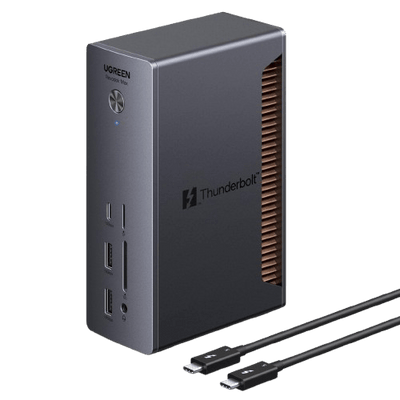
UGREEN Revodok Max Docking Station (Thunderbolt 5, 13-in-1, 8K Display)

If you’re building a full desk setup with multiple devices, a Thunderbolt docking station gives you the most flexibility.
These hubs are designed for heavier workloads, handling large file transfers, multiple displays, and several connected devices at the same time. The UGREEN Revodok Max Docking Station stands out with Thunderbolt 5 support, offering faster bandwidth compared to standard USB hubs.
{{UGPRODUCT}}
It’s especially useful for setups that involve:
- High speed data transfers for large files
- Support for high-resolution displays, including 8K
- Connecting multiple peripherals without slowdowns
- Maintaining stable performance during demanding tasks
With a 13-in-1 design, it brings everything into one place, making it a practical choice for creators, professionals, or anyone with a more complex workstation.
Best USB-C Hub for MacBook and USB-C Laptops
UGREEN USB-C Hub 4-Port USB 3.2 10Gbps Data Hub (2 USB-C & 2 USB-A)

Modern laptops, especially MacBooks often rely on USB-C, which makes having extra ports almost essential.
The UGREEN USB-C Hub 4-Port USB 3.2 Data Hub keeps things simple while still delivering fast performance. With support for up to 10Gbps transfer speeds, it handles everyday tasks like connecting external drives, keyboards, or accessories without noticeable slowdowns.
{{UGPRODUCT}}
The mix of USB-C and USB-A ports also helps bridge newer devices with older accessories, so you don’t have to think about compatibility.
Best Powered USB Hub for Workstations
UGREEN USB-C Hub 4 Ports (USB-C to USB Hub)

For desk setups with multiple connected devices, stability becomes more important. A powered USB hub uses an external power source to keep everything running smoothly, especially when you’re connecting several peripherals at once. This helps avoid common issues like unstable connections or devices not receiving enough power.
The UGREEN USB-C Hub 4 Ports works well in this type of setup, providing consistent performance for things like external drives, keyboards, and other accessories used throughout the day.
{{UGPRODUCT}}
Best Portable USB Hub for Everyday Use
If you move between different workspaces, portability starts to matter more than anything else. A portable USB hub makes it easy to connect devices quickly without adding bulk to your setup. It’s useful for everyday situations like working in a café, a classroom, or while traveling.
These hubs are designed for simple tasks, plugging in USB drives, wireless receivers, or small accessories without needing extra setup. For many people, a basic portable hub ends up being the most practical option for daily use.
Best USB Hub for Multi-Device Connectivity
UGREEN USB 3.0 Switch (2 Computers Sharing USB-C & USB-A Devices)

In setups with more than one computer, like a work laptop and a personal desktop, switching cables back and forth can get frustrating pretty quickly. A USB switch hub simplifies this by letting you share the same peripherals across two devices. Instead of unplugging your keyboard, mouse, or external drive every time, you can switch between computers with a single button.
The UGREEN USB 3.0 Switch is built for this kind of setup, making it easier to manage multiple systems while keeping your workspace clean and organized. It’s especially useful for hybrid work environments or shared desks.
{{UGPRODUCT}}
Quick Comparison of the Best USB Hubs
If you want a quick overview before deciding, this table highlights the key differences between the top USB hubs in 2026:
|
USB Hub |
Best For |
Key Feature |
Ports |
|
UGREEN Revodok Max Docking Station |
Best Overall |
Thunderbolt 5, 8K display support |
13-in-1 |
|
UGREEN USB-C Hub 4-Port USB 3.2 |
MacBook / USB-C laptops |
10Gbps data transfer |
4 ports |
|
UGREEN USB-C Hub 4 Ports |
Workstations |
Stable multi-device connectivity |
4 ports |
|
Portable USB Hub |
Everyday carry |
Compact and lightweight |
Varies |
|
UGREEN USB 3.0 Switch |
Multi-computer setups |
Device sharing between systems |
Multiple USB |
Key Features to Look for in the Best USB Hubs
Once you’ve seen the different types of USB hubs available, the next step is understanding what actually makes one work well in everyday use. On the surface, many hubs look similar, but differences in ports, speed, and power can affect how smoothly your setup runs. Before choosing a hub for your laptop, tablet, or workstation, it helps to focus on the features that match how you use your devices day to day.
Number and Types of Ports
One of the first things to check is the variety of ports available. The right combination depends on what you plan to connect. Common options include:
- USB-A for keyboards, mice, and flash drives
- USB-C for newer devices and accessories
- HDMI or DisplayPort for external monitors
- SD or microSD card readers for cameras and storage
Having the right mix means you won’t need to constantly unplug and swap cables.
Data Transfer Speed and USB Standards
Transfer speed becomes noticeable when you’re moving files regularly, especially larger ones. Different USB standards offer different performance levels:
- USB 3.0 / USB 3.2 Gen 1 – up to 5Gbps
- USB 3.2 Gen 2 – up to 10Gbps
- Thunderbolt – higher bandwidth for more demanding tasks
If you’re working with videos, high resolution photos, or large project files, a faster hub can save time and make your workflow feel much smoother.
Power Delivery Support
Some USB hubs support Power Delivery (PD), which lets your laptop or tablet charge while you’re using the hub for other devices. This is especially helpful for USB-C laptops with limited ports, since one connection can handle both charging and data at the same time. If you plan to charge your laptop through the hub, make sure it supports enough wattage to match your device.
Build Quality and Heat Management
When you’re connecting multiple devices, a USB hub can warm up, especially during heavier use. A well built hub is designed to handle that, with features like:
- Metal or aluminum housing for better heat dissipation
- Reinforced cables and connectors
- Stable internal components for consistent performance
These details help keep the hub running reliably and can extend its lifespan with regular use.
Compatibility With Laptops and Tablets
Before choosing a USB hub, it’s worth checking that it works fully with your device. Most hubs are widely compatible, but certain features depend on what your laptop or tablet supports. For example:
- USB-C laptops often support Power Delivery and video output
- Tablets may have limited support depending on the operating system
- Thunderbolt-enabled devices can take advantage of higher performance hubs
Taking a moment to confirm compatibility helps ensure all ports and features work as expected.
How to Choose the Right USB Hub: Powered vs Portable Options
When choosing a USB hub, one of the first decisions is whether you need a powered hub or a portable one. Each is designed for a different type of setup, so the right choice depends on how and where you use your devices. Understanding the difference makes it easier to pick something that fits your daily routine instead of overpaying for features you don’t need.
What Is a Powered USB Hub
A powered USB hub uses its own external power source instead of relying only on your laptop or tablet. With that extra power, it can support multiple devices at the same time without affecting performance. This makes it a strong choice for desk setups where you’re connecting things like external drives, keyboards, webcams, and other accessories. Because it provides more stable power to connected devices, a powered hub is often a better fit for workstations or more demanding setups.
What Is a Portable USB Hub
A portable USB hub is designed for flexibility when you’re not tied to one workspace. It draws power directly from your laptop or tablet, so there’s no need for an external adapter. That makes it quicker to set up and easier to use when you’re moving between locations.
They’re popular because they are:
- Easy to carry in a laptop bag
- Quick to plug in and use
- Well suited for everyday connections
Portable hubs are a good fit for students, travelers, and remote workers who need simple, reliable connectivity throughout the day.
Advantages of Powered USB Hubs
Powered USB hubs are designed for setups where multiple devices are connected at the same time. Because they use a dedicated power source, they can handle heavier workloads more consistently without running into performance issues.
They’re useful because they offer:
- More stable performance when several devices are connected
- Better support for accessories that require more power
- Fewer interruptions during extended use
For workstation setups, this added stability makes a noticeable difference over time.
Benefits of Portable USB Hubs
Portable USB hubs are built for convenience, especially when you’re working in different places throughout the day. They’re best suited for lighter tasks and quick connections, where simplicity matters more than handling multiple high power devices.
They’re useful because they offer:
- A lightweight, easy-to-carry design
- Quick plug-and-play setup
- No need for an external power source
For everyday use, like connecting a USB drive, wireless receiver, or small accessories, they provide a simple and reliable solution.
Choosing a Hub for Your Setup
The right USB hub depends on how and where you plan to use it. Looking at your devices, workspace, and daily habits can make it much easier to narrow down the best option.
USB-C laptops
Many modern laptops rely on USB-C, so a hub becomes almost essential. A model that supports multiple ports, display output, and Power Delivery can make everyday use much more convenient.
Desktop workstations
If your setup includes several peripherals, a powered hub or docking station is usually the better choice. It keeps everything running smoothly without connection issues.
Port requirements
Think about what you connect most often. If you regularly use external drives, monitors, or accessories, a hub with more ports and varied options will save you time.
Performance vs portability
Some hubs are built for performance, while others are easier to carry. Larger hubs offer more features, while compact ones are better suited for travel or flexible work setups.
Budget considerations
Simpler hubs are usually more affordable, while advanced docking stations offer more features at a higher price. Finding the right balance depends on how much you plan to use it.
Final Thoughts: Choosing the Best USB Hub for Your Setup
Choosing the best USB hub in 2026 comes down to how you actually use your devices. Some setups call for a full docking station with multiple connections and display support, while others just need a simple way to add a few extra ports on the go.
Once you focus on what matters, port options, transfer speed, power support, and compatibility, it becomes much easier to find a hub that fits into your workflow. The right choice doesn’t just add ports, it makes your setup feel more flexible and easier to manage day to day.
FAQ
Do USB hubs reduce data transfer speed?
Not necessarily. The speed mainly depends on the USB standard supported by the hub and the devices connected to it. For example, hubs using USB 3.2 or Thunderbolt can handle high transfer speeds, while older standards may be slower. If multiple devices are connected at the same time, they may share bandwidth, which can affect overall performance.
Are powered USB hubs better than portable ones?
It depends on how you plan to use them. Powered USB hubs are better for setups with multiple or power-hungry devices, since they provide more stable performance. Portable hubs are more convenient for travel and everyday use, especially when you just need a few extra connections.
Can a USB-C hub connect to an external monitor?
Yes, many USB-C hubs support external displays if they include ports like HDMI, DisplayPort, or USB-C video output. Just keep in mind that your laptop also needs to support video output through its USB-C port for this to work properly.
How many devices can a USB hub support at the same time?
It depends on the number of ports and the hub’s power capacity. Basic hubs usually support around four to five devices, while larger docking stations can handle more. Powered hubs tend to perform better when multiple devices are connected at once.
Are USB hubs compatible with MacBook and Windows laptops?
Yes, most USB hubs work with both MacBook and Windows laptops. As long as the connection type matches USB-A, USB-C, or Thunderbolt, the hub should function normally. Some features, like display output or Power Delivery, may depend on your specific device.