What is OpenClaw (Clawdbot)? Why Many Users Run It on a Mac mini
OpenClaw is one of the clearest early signals that “agentic AI” is shifting from demos into day-to-day behavior. Instead of opening a chat tab, asking for help, copying text, and pasting it into another app, OpenClaw is designed to live inside the channels people already use, then take follow-on actions when given permission. Coverage of its breakout moment emphasized three traits that mainstream users instantly understand: it can remember context across time, it can message you first, and it can automate real tasks across apps, not just talk about them.
OpenClaw’s differentiator is not that it is another AI assistant. It is intended to run continuously as a local or self-controlled gateway that can route messages, retain state, and execute tasks. That is why many users gravitated toward the Mac mini as a small, quiet, dedicated always-on box rather than running the agent on the same computer they carry around.
What Is Openclaw and A Short History
OpenClaw is an open-source personal assistant that you can host yourself, and that stays online, serving as a bridge between your chat surfaces and the tools you use. The goal of OpenClaw is to generate text, execute workflows, interact with services, and maintain context over time. In other words, it lives in the places where you actually communicate, like WhatsApp, Telegram, iMessage, Slack, Discord, Signal, and more, and can automate tasks if you want it to.
In real life, the simplest mental model is a textable operations layer where you message it in the same place you message people. It can keep track of ongoing threads, send briefings or reminders, and carry out permitted actions like drafting replies, summarizing, organizing, or initiating automation steps.
How Openclaw Works When It Runs on Your Own Infrastructure
The self-hosting of OpenClaw in your own environment means that it will be running as a background service on a device that you have access to, and this will act as the routing service between your chat app, your integrations that have been set up, and the service provider that you have selected. It is similar in spirit to how macOS itself manages long-running background tasks, where services are supervised by the operating system rather than being an app you keep open.
Why The Mac Mini Became the Default Always-On Host
The Mac mini’s appeal is that it is designed to be stationary, plugged in, and always available. Apple’s official tech specs highlight the small footprint and connectivity options, including Ethernet and multiple Thunderbolt ports depending on configuration.
As such, OpenClaw’s viral narrative of living where you message positions iMessage as a major messaging surface for many Apple households and small businesses. That makes a Mac-based always-on host feel natural, even though other deployments are possible.
Furthermore, a dedicated host reduces the cognitive and security blast radius. This implies that you are less likely to mix an experimental agent runtime with your everyday work machine. OpenClaw agents behave like identities and should be treated as such, including separate accounts and controlled access.
The Real Driver: Always On Assistants Change What Hardware Needs to Look Like
For the majority of users, the limiting factor is whether the system is online, reachable, and stable, as well as the cleanliness of the workflow integrations. Once the OpenClaw system is thought of as an infrastructure, the limiting factors change from compute to stability and workflow, which means that the limiting factors will be:
- Port access and cable management: Having the system always on the desk is problematic since the ports are hard to access, the cables are permanently connected, and there is a need for reliable connectivity for storage, dongles, etc.
- External storage expansion for logs, memory, and workflows: Having agents that run continuously means that there is a need for the expansion of external storage for logs, memory, and workflow outputs. Even without the need to go into the details of the system, the need for the expansion of external storage is intuitive.
- Stable desk setup that stays connected: In addition to network uptime, stability must also include physical stability: consistent power, consistent cabling, and predictable placement of receivers and storage.

The Mac mini docking foundation for an always-on OpenClaw setup
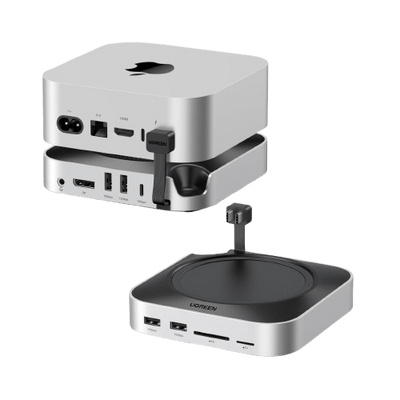
UGREEN Mac mini M4 docks are plug-and-play expansion bases, intended specifically for Mac mini M4 models with alignment and compatibility considerations. This reduces friction in always-on setups where you do not want intermittent fit or port mismatch issues.
Docking stations include the UGREEN Mac mini M4 Docking Station with NVMe SSD, which comes with a USB Type-C host interface, 8 total USB ports, and a 10 Gbps data transfer rate.
{{UGPRODUCT}}
Also, the UGREEN Mac mini M4 Dock with 4K 144Hz DisplayPort and SSD Enclosure comprises a USB Type C host interface, plug and play positioning, and 10 Gbps data transfer rate, and also provides a display expansion plus SSD enclosure.
{{UGPRODUCT}}
The key advantages of the UGREEN docking stations include:
- High-level port expansion and fast data transfer framing for always-on workflows
In the always-on assistant scenario, the dock provides users with traveling convenience due to its high compatibility, but more importantly, it makes the Mac mini behave as a small server node. Therefore, it allows for easy access to ports, predictable connectivity, and storage expansion possibilities.
- Plug-and-play usability framing for a mini server-style desk setup
The plug-and-play and fast data transfer features are essential to the OpenClaw infrastructure needs. Users want fewer moving parts once the system is running.
- High compatibility.
Both docking stations are designed and optimized for the Mac mini M4
- Wireless receiver interference:
USB 3.0 frequencies can interfere with 2.4GHz dongles, hence the need for separation to improve stability. In a permanent, always-on setup where a wireless keyboard or mouse receiver may sit near high-speed ports, simply moving the receiver away from USB 3.x activity can reduce lag and dropouts.
OpenClaw value for home users and families
- Everyday use cases that match real life
OpenClaw focuses on the things that help drive more value to the family.
- Proactive reminders and daily summaries
No longer do you have to remember to ask, as OpenClaw will remind you, inform you, and let you know what is important without you even thinking about it. Finally, this realizes the promise of a voice assistant that sits in the background and is useful without having to be asked.
- Household scheduling and coordination
For households, individuals must accomplish mundane tasks, but they are an important part of the family. Schedules, reminders, and what’s happening today are more important than anything else. By being integrated into the messaging app, OpenClaw naturally fits into the way households already communicate through quick, short messages.
- Smart routines at a high level
At a high level, OpenClaw is an event-driven agent, which means that it notices, summarizes, or suggests the next action in response to something changing. For the non-technical user, the key is that these are introduced gradually with limits so that they are useful rather than overwhelming.

Source: unsplash.com
OpenClaw value for businesses and teams with realistic guardrails
- Internal workflows
Businesses are concerned with repeatability, auditability, and access control, which implies a more structured use and possibly a more conservative access control model.
- Monitoring, summaries, and recurring operational tasks
The safest initial business use cases will be "read-heavy" – that is, monitoring systems, summaries, and operational reports are useful without granting the agent any particular action authority. This is in line with the feedback that good summaries are more useful than overly specific instructions, as long as they are clearly sourced.
- Structured automations with approvals
Actions that have side effects should not run automatically. A practical safety model is for the agent to suggest actions and require explicit approval before execution, especially for sensitive operations.
Why businesses may prefer on-premises style setups for sensitive workflows
The preference comes down to control. Businesses want to decide where logs live, which identities the agent uses, and how secrets are stored. From a security perspective, agents should be treated like identities that are continuously mediated, not like apps that receive one-time permissions.
A clear warning is appropriate. Security researchers have repeatedly shown that self-hosted automation and agent systems can be unintentionally exposed to the public internet due to simple misconfigurations. This pattern is well documented across various dashboards, admin panels, and developer tools, and highlights how quickly control interfaces can become reachable if deployment and network boundaries are not carefully managed.
There are also broader marketplace and supply chain considerations. Across the emerging agent and automation ecosystem, researchers have observed malicious or unsafe extensions that rely on social engineering, misleading setup steps, or unnecessary prerequisites. As a result, businesses should apply procurement-style review and approval processes to any agent integrations or extensions they allow, especially those that introduce new permissions or execution capabilities.
Conclusion
OpenClaw is an early mainstream representation of an always-on agent that can take action. The mainstream significance of OpenClaw is that it makes agents concrete: always available, embedded in messaging, persistent, and able to take action. This is directly related to the industry trend of action-taking systems and computer usage agents.
Mac mini is popular for being a plugged-in, always available Apple ecosystem machine, and for letting the assistant feel like infrastructure instead of an app. Apple itself provides specifications for it as a compact desktop computer with excellent connectivity options and fast networking options available.
If you have determined that an always available Mac mini is the appropriate host, then the limiting factors become ports, expansion, and a nice, tidy layout. UGREEN has developed a range of Mac mini M4 docks designed to overcome these physical limitations.
FAQ About OpenClaw
1. What kinds of tasks can OpenClaw actually perform?
OpenClaw can handle a wide range of automation and AI-driven tasks depending on how it is configured. It can automate message replies, trigger workflows based on keywords or events, connect to APIs, retrieve data from databases, and run AI-powered conversations using either local models or external AI services. Some users also integrate it with home automation systems, monitoring tools, or productivity platforms. The exact capabilities depend on the installed plugins, connected services, and available system resources.
2. How does OpenClaw integrate with messaging apps like WhatsApp, Telegram, iMessage, Signal, or Discord?
OpenClaw typically integrates with messaging platforms through official bot APIs, webhooks, or bridge services. For example, Telegram and Discord offer official bot APIs, making integration relatively straightforward. WhatsApp usually requires access to the WhatsApp Business API, which may involve additional setup and compliance requirements. Signal often relies on a CLI-based bridge service running locally, while iMessage integration generally requires a macOS-based automation bridge due to the lack of a public API. The integration method depends heavily on each platform’s technical and policy limitations.
3. What are the hardware and performance requirements for running OpenClaw reliably?
The hardware requirements vary based on how OpenClaw is used. For basic automation tasks without running local AI models, a system with at least 4 GB of RAM and a dual-core CPU is typically sufficient. However, if running local language models, more powerful hardware is needed. Lightweight AI models generally require around 16 GB of RAM, while larger models may require 32 GB or more, along with a GPU that has sufficient VRAM for smooth performance. Using SSD storage and maintaining a stable internet connection are also important for reliability.
4. What are the pros and cons of running OpenClaw on dedicated home hardware versus cloud hosting?
Running OpenClaw on dedicated home hardware provides greater data privacy and full control over the environment. It avoids recurring cloud fees and can integrate easily with local systems. However, it requires upfront hardware investment, ongoing maintenance, and depends on the reliability of your home internet connection. Cloud hosting, on the other hand, offers better scalability, higher uptime, and access to powerful GPU resources when needed. It is often more suitable for public-facing bots or business use cases. The downside is recurring costs, potential data privacy concerns, and reliance on third-party infrastructure.