Charge Your Phone Without a Charger (Yes, It’s Possible!)
Your phone and your charger might seem like two peas in a pod, but you can actually charge your phone without its usual wall charger. So, the next time the power goes out, or you’re in a pinch, let this article help you learn how to charge your phone without a charger.
Key Takeaways
- You can charge your phone without its usual wall adapter by using another powered USB source, a charged power bank, or a suitable solar charger.
- Wireless charging removes the cable between a compatible phone and charger, but the charger still needs a power source.
- Airplane Mode can conserve battery when cellular connectivity is not needed, but it also disables normal cellular calls and texts.
- Keep your phone out of direct sunlight and excessive heat while charging or storing it.
Can I Charge My Phone Without Electricity?
You can charge your phone without household mains power, but not without electrical energy altogether. A power bank stores energy, a solar charger converts sunlight into electricity, and a hand-crank charger generates electricity from movement.
A wireless charging pad also needs power from an adapter or another suitable source. During an outage, a previously charged power bank can provide backup power; an unplugged desktop wireless charger cannot.
How to Charge Your Phone Without a Charger
There are several ways to charge your phone without its usual wall adapter. From powered USB ports to portable backup sources, here are four options to consider.
USB Ports
One common way to charge your phone without a wall charger is to connect it to a powered USB port on a laptop or in a car. Use a compatible cable and check that the port supplies charging power.
The laptop or vehicle still needs an available power source. Some car USB ports only work when the vehicle’s accessory power is on, and charging speeds can vary by port.
Solar-Powered Charger
A solar-powered charger can be useful outdoors or during a power outage. Solar panels convert sunlight into electricity, which a suitable charging system can deliver to your phone or store in a compatible battery.
Output depends on sunlight, weather, panel size, and the charging equipment. Keep the phone shaded while the panel receives sunlight, and follow the charger’s instructions. The U.S. Department of Energy explains how solar panels produce electricity.
Wireless Chargers
Wireless chargers let compatible phones charge without a cable plugged directly into the phone. However, a desktop charging pad normally needs a cable connected to a powered adapter or another suitable source.
A charged wireless power bank is a portable alternative when you do not have access to a wall outlet. Check your phone’s wireless-charging compatibility and place it correctly on the charging surface.
Hand-Crank Chargers
Another way to generate charging power without household electricity is to use a hand-crank charger designed for phones. It converts manual movement into electrical energy.

Use a commercial device with a suitable regulated USB output and follow its instructions. Performance varies, so treat it as an emergency backup rather than assuming it will quickly recharge a modern phone.
Battery Saving Tips During Emergencies
Preserving your phone battery is vital in times of emergency. Whether it’s during a natural disaster or a power outage, it’s important to conserve power so you can stay reachable and informed when it matters most.
Here are a few tips on how to save your phone battery during emergencies.
1. Turn On Airplane Mode When Connectivity Is Not Needed
Searching for a weak or unavailable cellular signal can consume battery power. If you do not currently need cellular connectivity, Airplane Mode can help conserve power.
Remember that normal cellular calls and texts will be unavailable while cellular connectivity is disabled. If you are waiting for emergency contact or important updates, keep the required connection active or check in at planned intervals.
2. Avoid Using Unnecessary Apps
Using unnecessary apps keeps your phone busy and can drain the battery faster. Prioritize essential tasks, reduce screen brightness, and keep calls and screen time short when possible.
3. Avoid Leaving Your Phone in Hot Places
Whether you’re in an emergency or not, avoid leaving your phone in direct sunlight or a hot vehicle. Excessive heat can damage battery health and may cause charging to slow or stop.
Keep your phone in a shaded, ventilated location within its recommended operating temperature range. For iPhone, see Apple’s battery-care and temperature advice.
4. Use Your Power Saver Option
Many phones offer a battery-saving mode that reduces background activity or other power use. Enable Battery Saver or Low Power Mode where available, and check which functions it limits on your device.
Build a Simple Backup Charging Kit
A simple backup charging kit can help you stay powered during an outage or when your usual charger is unavailable. Here’s a short guide to building one.
Primary Power Source
When building your backup charging kit, choose a power source with enough usable capacity for your phone and the time you expect to spend away from an outlet. Charging speed also depends on the power bank’s output, the cable, and your phone’s supported charging protocol.
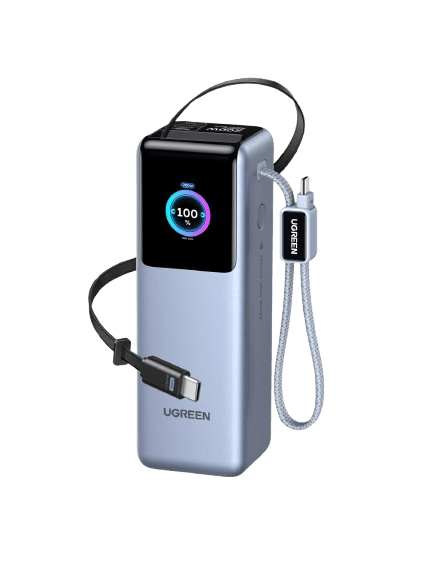
The UGREEN 200W Power Bank 25000mAh is a high-capacity option for carrying backup power. The number of phone charges varies with the phone’s battery size, conversion losses, and how you use the device while charging.
{{UGPRODUCT}}
Keep the power bank charged before an emergency and periodically check its remaining battery level.
Essential Multi-Device Cables
Once you’ve chosen a power source, gather compatible cables for the devices you need to charge. Check connector types and power ratings rather than assuming one cable fits every device.
If you plan to recharge from a vehicle, include a suitable car USB adapter and cable. Match its output to the power bank’s input requirements, and remember that the vehicle’s charging outlet must be powered.
Organizer Case
A weather-resistant, semi-rigid electronics travel case can keep cables organized and help protect equipment from minor impacts and splashes. It does not make a power bank waterproof or safe to store in excessive heat.
Keep the kit dry, avoid crushing or bending batteries, and remove charging equipment from a closed organizer if it prevents adequate ventilation during use.

Conclusion
Charging your phone without its usual wall adapter is possible when another suitable energy source is available. A powered USB port, charged power bank, solar charger, or suitable hand-crank charger can provide an alternative.
Prepare your backup kit in advance, check compatibility, and conserve battery during emergencies. Wireless charging can simplify the connection, but it still needs power.